Set Wizard1.16
Publisher Description

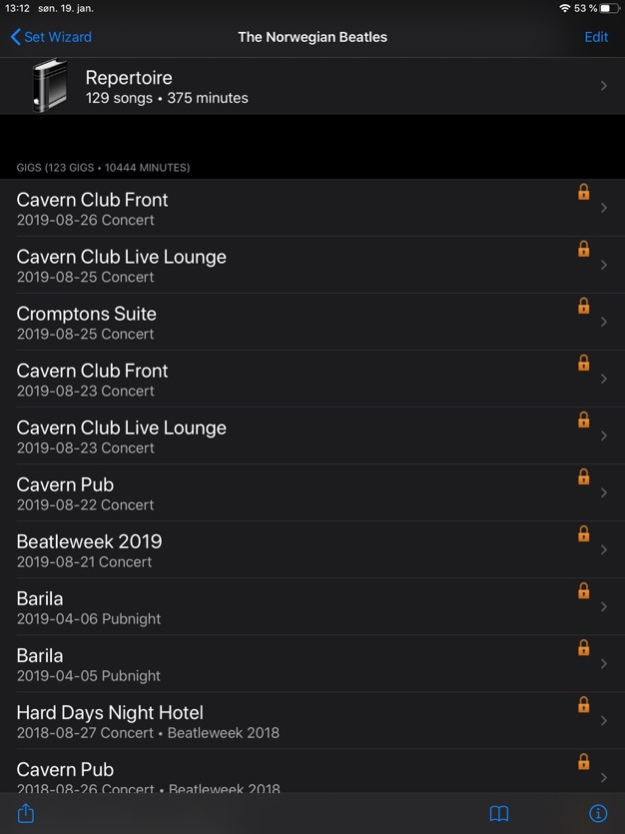
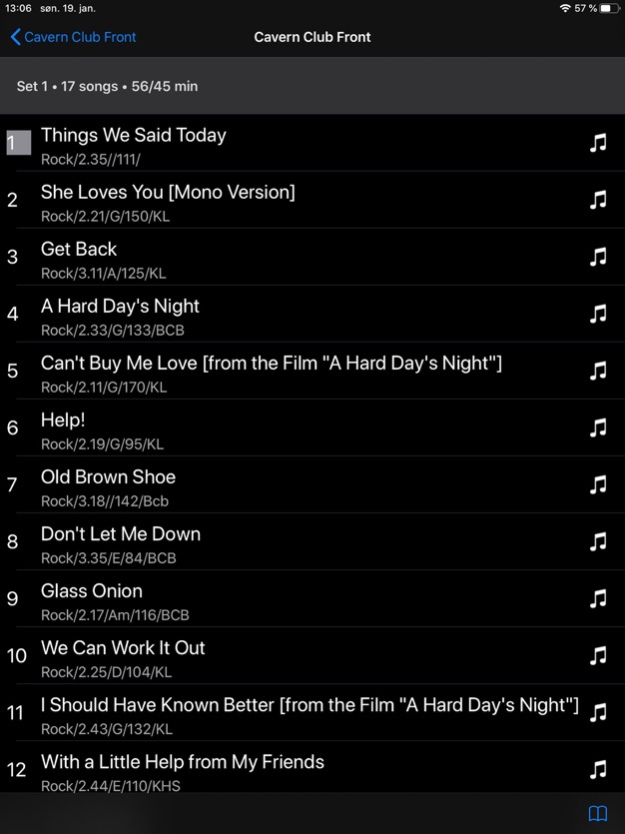
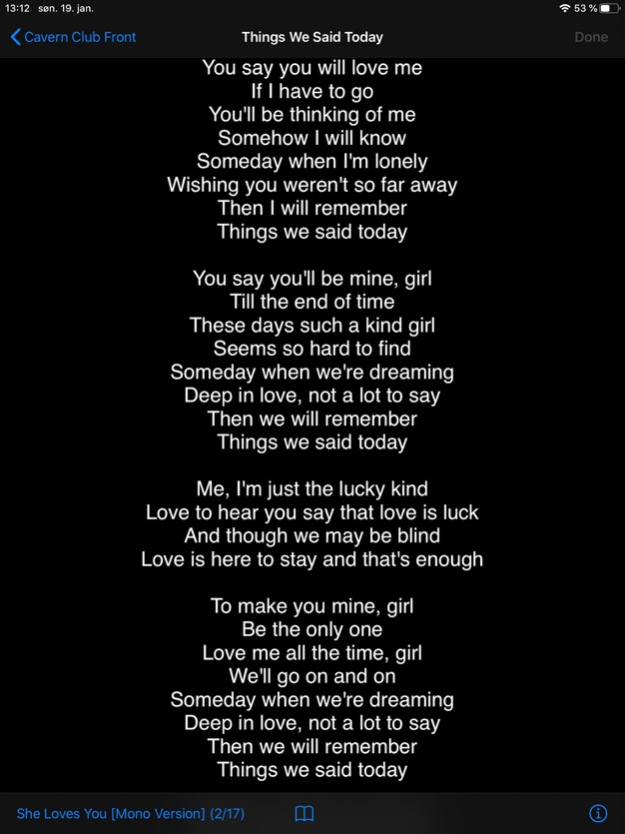
Get in control of your repertoire, gigs and set lists
- Create setlists easily on your iPhone or iPad
- Import songs from iPhone/iPad Music Library
- Create setlist as PDF or plain text
- Playback songs from your iPhone library directly from your repertoire and setlist
- Set loop points and access lyrics directly from Set Wizard
- Performance view with notes and automatic text scrolling. Jump to next/previous song by the press of a flic button
The requirements for Set Wizard were put together by the members of a real band, The Norwegian Beatles. The need for a simple and fun way to create the evenings setlist gave birth to Set Wizard. Actually the first set of requirements were written down on the Notes application on my iPhone in a band-bus on the way to a gig in August 2010.
"Often we find ourselves backstage minutes before the concert, without a proper setlist, trying to put something together on a piece of paper. These last minutes you would rather spend on other activities, like warming up your voices, rather than struggling with the setlist."
**Import songs from the iPhone/iPad Music Library
Get started with creating your bands repertoire by importing songs from the iPhone/iPad Music Library. In many cases you already have the songs your bands are playing on your iPhone/iPad. Import them into your bands repertoire in Set Wizard with a few clicks. The songs are then directly ready to be used by Set Wizard to form set lists. Of course you can also add songs manually to the repertoire.
**Create setlists for your next gig by easy pick and select from the repertoire or by a one-click copy from a previous gig
Set Wizard lets you easily pick songs from the repertoire to form the set. If a song is previously picked, either in this set or another set in this gig, it will be greyed out. Anyway, you can still pick it. Set Wizard keeps track of the length of your set as you add or delete songs so you always know when to stop. You can alter the order of songs by drag and drop.
**Move songs easily between sets
You would sometimes want to move songs between sets. With Set Wizard it is a breeze.
**Print directly or e-mail your setlist as PDF-attachment or plain text. SMS is also supported
Control the font-size and song attributes to be included on the setlist. In most cases you would prefer to have the songs for one set on one page only. Dependent on the number of songs and the song attributes you would like to print, the font-size can easily be altered to achieve this.
**Share repertoire, gigs and sets with your band-mates
Set Wizard support easy export and import of band data. By the click of one button, a special Set Wizard xml file including all data is generated ready to be sent as an e-mail attachment. Receivers can then just as easy import this file into Set Wizard and thus merge the data with existing data. This file also serves as an additional backup of your data.
**Interface towards iPhone/iPad Music Player for playback of songs. Play songs from repertoire and set lists directly with one-click only
**"Now Playing" view for rehearsal with possibilities to set loop points in song and link to song lyrics from your favorite lyrics website
**Performance view for displaying lyrics and chords during performance. Automatic text scrolling
Version History Built for IOS 16 1.16 05/21/2023 Added metronome function 1.15 05/04/2021 Support for flic buttons added; control Set Wizard from a button.
Improved user interface in Performance View.
Bugfixes. 1.14 01/21/2020 Swipe left or right for next or previous song 1.13 12/10/2019 Support for dark mode
Set scroll start and stop time per song
Bugfixes 1.12 12/02/2019 Built for iOS 13. Fixing problem with importing xml files. 1.11 11/12/2019 Built for iOS 12
Now possible to populate repertoire from other bands in the database
Bugfixes 1.10 11/02/2018 Larger font in Set View for iPad.
Set no of bars count-in for Notes view with preset for auto or manual scroll.
Enabled text alignment options for notes.
Bug fixes. 1.9 12/04/2016 Built for IOS9, now for all platforms.
Supports both portrait and landscape mode. 1.8 03/31/2016 Minor updates and bugfixes. 1.7.2 01/31/2015 Bugfixes.
-Autoscroll was not working unless a tempo was set on a song.
-Changed settings from Performance View did not affect current song settings. 1.7.1 12/17/2014 Automatic scrolling in Performance View
Easier setting of loop-points in Now Playing View
Better handling of different iPhone screen sizes
Minor bugfixing 1.7 11/04/2014 Fixed bug that caused erroneous numbering of songs when copying gig 1.6.2 10/20/2013 Fixing crash at startup 1.6.1 10/08/2013 Built for iOS 7
New notes field for lyrics and chords
New Performance View
Send setlist as SMS message
Drag songs between sets
Lots of minor improvements 1.6 10/03/2013 Added preferences for song, set and gig parameters.
Some minor gui updates 1.5 07/03/2013 Added possibility to register song tempo by tapping
Re-built for iOS6 to make use of iPhone 5 screen 1.4 10/19/2012 Now possible to select printing font
Possible to select prefered lyrics website
Possible to add band picture from library or camera
Added artist field to songs
Some minor bugfixes 1.3 05/07/2012 Fixed bug that caused the application to crash when opening Now Playing View
Changed some icons in Now Playing View. 1.2.1 02/27/2012 -Interface towards iPod Music Player for playback of songs. Play songs from repertoire and set lists directly with one-click only
-New "Now Playing" view for rehearsal with possibilities to set loop points in song and link to song lyrics from your favorite lyrics website
-New locking mechanism to protect your gig data from accidental deletion
-Minor bugfixes 1.2 02/21/2012 Better encoding of XML exported data allows all characters in XML body.
Fixed ordering of songs in Testband test data.
Icon cosmetics. 1.1 11/20/2011 1.0 10/28/2011
About Set Wizard
The company that develops Set Wizard is Vegar Johansen. The latest version released by its developer is 1.16.
To install Set Wizard on your iOS device, just click the green Continue To App button above to start the installation process. The app is listed on our website since 2026-09-19 and was downloaded 23 times. We have already checked if the download link is safe, however for your own protection we recommend that you scan the downloaded app with your antivirus. Your antivirus may detect the Set Wizard as malware if the download link is broken.
How to install Set Wizard on your iOS device:
- Click on the Continue To App button on our website. This will redirect you to the App Store.
- Once the Set Wizard is shown in the iTunes listing of your iOS device, you can start its download and installation. Tap on the GET button to the right of the app to start downloading it.
- If you are not logged-in the iOS appstore app, you'll be prompted for your your Apple ID and/or password.
- After Set Wizard is downloaded, you'll see an INSTALL button to the right. Tap on it to start the actual installation of the iOS app.
- Once installation is finished you can tap on the OPEN button to start it. Its icon will also be added to your device home screen.
Program Details
System requirements
Download information
Pricing
Version History
version 1.16
posted on 2026-09-19
Version History Built for IOS 16 1.16 05/21/2023 Added metronome function 1.15 05/04/2021 Support for flic buttons added; control Set Wizard from a button.
Improved user interface in Performance View.
Bugfixes. 1.14 01/21/2020 Swipe left or right for next or previous song 1.13 12/10/2019 Support for dark mode
Set scroll start and stop time per song
Bugfixes 1.12 12/02/2019 Built for iOS 13. Fixing problem with importing xml files. 1.11 11/12/2019 Built for iOS 12
Now possible to populate repertoire from other bands in the database
Bugfixes 1.10 11/02/2018 Larger font in Set View for iPad.
Set no of bars count-in for Notes view with preset for auto or manual scroll.
Enabled text alignment options for notes.
Bug fixes. 1.9 12/04/2016 Built for IOS9, now for all platforms.
Supports both portrait and landscape mode. 1.8 03/31/2016 Minor updates and bugfixes. 1.7.2 01/31/2015 Bugfixes.
-Autoscroll was not working unless a tempo was set on a song.
-Changed settings from Performance View did not affect current song settings. 1.7.1 12/17/2014 Automatic scrolling in Performance View
Easier setting of loop-points in Now Playing View
Better handling of different iPhone screen sizes
Minor bugfixing 1.7 11/04/2014 Fixed bug that caused erroneous numbering of songs when copying gig 1.6.2 10/20/2013 Fixing crash at startup 1.6.1 10/08/2013 Built for iOS 7
New notes field for lyrics and chords
New Performance View
Send setlist as SMS message
Drag songs between sets
Lots of minor improvements 1.6 10/03/2013 Added preferences for song, set and gig parameters.
Some minor gui updates 1.5 07/03/2013 Added possibility to register song tempo by tapping
Re-built for iOS6 to make use of iPhone 5 screen 1.4 10/19/2012 Now possible to select printing font
Possible to select prefered lyrics website
Possible to add band picture from library or camera
Added artist field to songs
Some minor bugfixes 1.3 05/07/2012 Fixed bug that caused the application to crash when opening Now Playing View
Changed some icons in Now Playing View. 1.2.1 02/27/2012 -Interface towards iPod Music Player for playback of songs. Play songs from repertoire and set lists directly with one-click only
-New "Now Playing" view for rehearsal with possibilities to set loop points in song and link to song lyrics from your favorite lyrics website
-New locking mechanism to protect your gig data from accidental deletion
-Minor bugfixes 1.2 02/21/2012 Better encoding of XML exported data allows all characters in XML body.
Fixed ordering of songs in Testband test data.
Icon cosmetics. 1.1 11/20/2011 1.0 10/28/2011
version 1.16
posted on 2023-05-21
May 21, 2023
Version 1.16
Built for IOS 16
version 1.16
posted on 2023-05-21
Built for IOS 16
